Tag Archive: Photography

Slow Shutter Cam iPhone 4 app beat my Canon T1i?

snow-2-9-11-featured

The University where I work, UT Dallas, is closed today due to the sleet and snow that fell overnight here in Dallas. While I was having breakfast I was watching the weather show out our front window and thought to myself that it would be fun to take a few snow/sleet pictures with an iPhone 4 app I bought recently for 99ยข called Slow Shutter Cam by Cogitap Software.

I wanted to see if the app would be good at actually showing the snow falling. I had taken a shot last week in the snow with the app and knew it could do it, but I wanted to expand upon the idea and match the iPhone 4 app against my Canon T1i DSLR camera to see which one did a better job with the shot.

So I set up the Canon on a tripod and framed a shot shooting through our front window out into the street. I tried to match the shot view as best I could with the iPhone. I took a number of shots with the Canon, shooting at different shutter speed/aperture combinations trying to get a slow enough shutter speed to capture the snow and sleet falling.

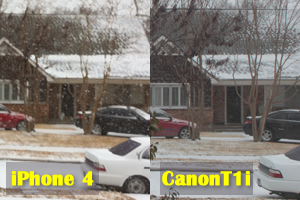
My results amazed me! I was using a Canon Ultrasonic 28-105mm 3.5-4.5 lens which gave me an f22 at the 28mm end. The shots I am showing were taken at 28mm f22 at 1/15th sec. exposure time (second shot) and 28mm f22 at 0.4 sec. exposure time (third shot). The iPhone 4 shot is at the top.

The iPhone 4 shot was the only one that really shows the snow and sleet falling. I just could not get any action out of the Canon DSLR in this situation. At 1/15th of a second, the DSLR had totally washed out the shot and obviously I needed at least a 3 second or longer shutter speed to capture the falling stuff.

The iPhone 4 handled it very easily giving me a shutter speed of 15 seconds at a sensitivity level in the app of 1. This was the best combo of settings I tested for the app. The actual size of the photo it gave me was 1936 x 2592 pixels, which is a good size, but not as large as the raw from the Canon, which was 4572 x 3162 pixels. I cropped them all down to the same pixel size and tried to keep the shot parameters the same. You can also click on these three shots to see a larger version of each.

Oh, and I did not use a tripod with the iPhone 4, I simply held it flush up against the window and held it steady through the 15 second exposure.

I will have to play around with this app some more using light trails and other experiments. You can take a look at the app on the Cogitap Software website where it goes into much more detail about the settings available and features. There is a link on the site directly to the iTunes store where you can read reviews as well or purchase the app.

For a buck this is a great steal of a photo app. If anyone else has tried this app I would love to hear about what you have tried to do with it.

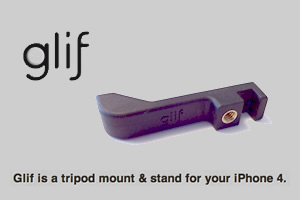
What is the Glif & why should you care?

glif-featured

I love my iPhone 4. It’s a great phone and the camera features are pretty super too, especially when you use some of the camera apps available to really bring out your creativity. The one killer photography feature missing from the iPhone 4 – the ability to use a tripod for low light and panoramic images.

A few months ago, while on Twitter (user name @gushin), I saw that my friend @mikedmerrill had tweeted about an item he had just purchased for his iPhone 4 called the Glif.

The interesting thing is that Mike had only placed an order that would be fulfilled ONLY if the product had enough supporters pledged to buy the product though a website called Kickstarter. To those unfamiliar to the concept and the site, as I was before I saw Mike’s tweet, here’s how it works:
A company or individual comes up with a concept for a product, service or creative thing, they put together a proposal, add text, video, graphics, whatever will convey the idea to someone on the web. Kickstarter reviews it, decides to include it or reject it. If accepted Kickstarter adds it to the site with different “offers” for people to choose from. Sort of like levels of participation. For a product it could be that you get one shipped for pledging $xx, for $xxx you get three shipped signed with a bonus and so on. There is a time/date limit set, a $ amount needed to fund the project and it goes live. If the project gets the needed funding pledged within the time frame set, the project is funded.

For the Glif, the goal was $10,000. That was the sum the developers had projected would be needed to start manufacturing. They got pledges of $137, 417 from 5,273 people so the project was on.

I pledged $20, which entitled me to one Glif shipped. I don’t remember exactly when I pledged, but on November 2, 2010, it funded. The Glif arrived on my doorstep right around New Years. During the two months that it went into production, the project team sent updated emails with video’s and images keeping the 5,273 updated on the progress. It was really neat.

The product does work as advertised and has a really snug fit to the iPhone 4. More on the actual product after I have had some more use with it.

To read more about the Kickstarter concept, Ryan carson over at Think Vitamin has written an insightful post about the concept that explains it way better than I have. The comments on the post have some interesting takes on the positive and negative aspects of the concept as well.

Does anyone have any experience with the Glif or Kickstarter they would like to share?

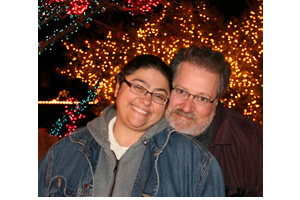
Eric Roachs’ shot of Ruthie and myself

Ruthie and Gush with Christmas lights

My friend and fellow photographer, Eric Roach, sent me this image after our holiday lights tour the other night. It was a great shot with lots of sparkly lights in the background and my smiling wife at my side. All I did to the shot was crop it, no other changes were made in Fireworks (my image editor of choice).

I’ll have to download some of the gazillion images off my own DSLR and get some of the posted here. Thanks Eric.

Here is a larger version of this image.